Edit: Now in new No-Typos Edition!
Monday, August 3, 2020
Chap. 8: Getting There
I'm getting down there in terms of what needs to be done. With the equipment arriving, I decided to start working on mounting the device and find the best place they could go, inside and out. I started working on the shop and the new barn. Once the new internet is installed and the management software that will control all of APs, indoor and outdoor, is set up on the main computer, I will be nearing the end of this project.

Sunday, July 26, 2020
Chap. 7: Even More Progress
Well, the day has finally come. The equipment has all arrived at A-I in Watertown and awaiting pick up. My stepfather is out of town until Monday and so we will have to get the equipment on Tuesday. Since last week, I have got the last of the connections to and from the new modem, that was provided by CenturyLink, done and ready to be used. I also did some cable rearranging to make everything look neater and out of the way. We have called Qwest, the providers, and hopefully, they will come out finish up with our telephone lines and have us switched over by the middle of the week. After that's done, the big job of setting up equipment, testing and settling connections begins.
Sunday, July 19, 2020
Chap. 6: Some Progress
Hello, it has been some time since the last update to this blog. With family vacations and life getting in the way, I do apologize for the lack of updates. But now I'm back and have made a bit of progress since the last post. Some substantial while others are menial. Here is a quick rundown of what has been done and what to come next.
- All of the equipment listed in the previous post has been ordered and currently, about 1/3 of the items have arrived at A-I Computers of Watertown, SD. Some items are on backorder but hopefully, we will have everything by either the end of this week or early next week.
- We have been getting areas where items and equipment will go prepared and ready for when the time comes for installation.
- In the meantime, I have been running power cable for the new modem, which took a while.
- I have also bought and hooked up the new landline phones in our house and the other house.
- My stepfather and I have been looking into what type of security camera to order and have started narrowing down our list and hope to have them order and shipped by the end of the week.
I hope to start working on getting equipment and cameras set up in the very near future and that will be where the real fun begins.
Sunday, June 28, 2020
Chap. 5: Equipment
After deciding we were switching to CenturyLink, they came out and set up a modem and reconnected out telephone lines. With CenturyLink ready to be connected, my stepfather and myself decided it was time to finalize our decisions on what equipment we wanted to use for routers, access points, and switches. I wanted to get some help and second opinions on what to use. So, I and my parents went to A-I Computers in Watertown, SD to see what ideas we all came up with. Most of the equipment recommended was from the company Ubiquiti.
Equipment List from A-I -
UniFi Long-Range Access Point:
Range – 600 Ft.
Networking Interface - (1) 10/100/1000 Ethernet Port
Ports - No
Buttons - Reset
Antennas - Dual-Band Antenna
Power Method - Passive Power over Ethernet (24V)
Power Supply - 24V, 0.5A Gigabit PoE Adapter
Operating Temperature - -10 to 70° C (14 to 158° F)
Operating Humidity - 5 to 95% Noncondensing
1 Unit - $109
5-Pack - $499
UniFi Security Gateway:
Networking Interfaces & Ports - (1) RJ45 Serial Port, (3) 10/100/1000 Ethernet Ports
Max. Power Consumption - 7W
Power Supply - 12VDC, 1A Power Adapter (Included)
Supported Voltage Range - 9 to 24VDC
Operating Temperature - -10 to 45° C (14 to 113° F)
Operating Humidity - 10 to 90% Noncondensing
1 Unit - $139
UniFi Switch 8:
Power Supply - External AC/DC Adapter: 48V, 0.5A, 25W AC/DC Power Adapter Included
Max. Power Consumption - 12W (Excluding PoE Output)
Data Rate - 8 Gbps, Non-Blocking
Operating Temperature - -5 to 45° C (23 to 113° F)
Operating Humidity - 5 to 95% Noncondensing
(8) Gigabit Ethernet Ports
(1) PoE Passthrough Port
1 Unit - $99
5-Pack - $480
UniFi Switch 8 60W:
(8) Gigabit Ethernet Ports
(4) Auto-Sensing IEEE 802.3af PoE Ports
Data Rate - 8 Gbps Total, Non-Blocking
60W AC/DC Power Adapter Included
Operating Temperature - -5 to 45° C (23 to 113° F)
Operating Humidity - 5 to 95% Noncondensing
1 Unit - $109
5-Pack - $540
UniFi Mesh PRO Access Point:
Range – 600 Ft.
Data Rate - 1750 Mbps
Omni-directional Super Antennas
Antennas - 3 Dualband antennas
Ports - (2) 10/100/1000 Ethernet
Buttons - (1) Reset
Operating Temperature - -40 to 70° C (-40 to 158° F)
Operating Humidity - 5 to 95% Noncondensing
1 Unit - $199
5-Pack - $975
They created a map design on what equipment should be placed where and how the range should look.
 *Red boxes mark buildings.
*Green hexagons mark spots where equipment may be installed (this includes routers, switches, wireless access points, and outdoor wireless gear as well).
*Blue lines are straight-line cable runs.
*White circles indicate indoor wireless signals, not-to-scale.
*Cyan gradient indicates outdoor wireless signals. The teal outline is the maximum range as described for the access point (600 feet).
We hope to have most, if not all, equipment ordered and shipped by the middle of the week this post is "posted".
Equipment List from A-I -
UniFi Long-Range Access Point:
Range – 600 Ft.
Networking Interface - (1) 10/100/1000 Ethernet Port
Ports - No
Buttons - Reset
Antennas - Dual-Band Antenna
Power Method - Passive Power over Ethernet (24V)
Power Supply - 24V, 0.5A Gigabit PoE Adapter
Operating Temperature - -10 to 70° C (14 to 158° F)
Operating Humidity - 5 to 95% Noncondensing
1 Unit - $109
5-Pack - $499
Networking Interfaces & Ports - (1) RJ45 Serial Port, (3) 10/100/1000 Ethernet Ports
Max. Power Consumption - 7W
Power Supply - 12VDC, 1A Power Adapter (Included)
Supported Voltage Range - 9 to 24VDC
Operating Temperature - -10 to 45° C (14 to 113° F)
Operating Humidity - 10 to 90% Noncondensing
1 Unit - $139
UniFi Switch 8:
Power Supply - External AC/DC Adapter: 48V, 0.5A, 25W AC/DC Power Adapter Included
Max. Power Consumption - 12W (Excluding PoE Output)
Data Rate - 8 Gbps, Non-Blocking
Operating Temperature - -5 to 45° C (23 to 113° F)
Operating Humidity - 5 to 95% Noncondensing
(8) Gigabit Ethernet Ports
(1) PoE Passthrough Port
1 Unit - $99
5-Pack - $480
(8) Gigabit Ethernet Ports
(4) Auto-Sensing IEEE 802.3af PoE Ports
Data Rate - 8 Gbps Total, Non-Blocking
60W AC/DC Power Adapter Included
Operating Temperature - -5 to 45° C (23 to 113° F)
Operating Humidity - 5 to 95% Noncondensing
1 Unit - $109
5-Pack - $540
UniFi Mesh PRO Access Point:
Range – 600 Ft.
Data Rate - 1750 Mbps
Omni-directional Super Antennas
Antennas - 3 Dualband antennas
Ports - (2) 10/100/1000 Ethernet
Buttons - (1) Reset
Operating Temperature - -40 to 70° C (-40 to 158° F)
Operating Humidity - 5 to 95% Noncondensing
1 Unit - $199
5-Pack - $975
UFiber GPON Wi-Fi Router:
Data Rate - 2.4 Gbps Downstream and 1.2 Gbps Upstream
24V passive PoE or a 24V, 0.5A power adapter
(1) GPON WAN Port
(4) RJ45 Gigabit LAN Port
Wi‐Fi
1 Unit - $69
They created a map design on what equipment should be placed where and how the range should look.

*Green hexagons mark spots where equipment may be installed (this includes routers, switches, wireless access points, and outdoor wireless gear as well).
*Blue lines are straight-line cable runs.
*White circles indicate indoor wireless signals, not-to-scale.
*Cyan gradient indicates outdoor wireless signals. The teal outline is the maximum range as described for the access point (600 feet).
We hope to have most, if not all, equipment ordered and shipped by the middle of the week this post is "posted".
Sunday, June 21, 2020
Chap. 4: Discussions
Sorry for the incredibly short post, this week was mainly discussion-based.
Having met with my parents for a few sit-downs about whether or not they would like to switch or stay with the current provider, they have decided to change internet providers and switch to CenturyLink. With better speeds, connectivity, and the good things that they heard from neighbors, they felt it was the best choice. It took them a long time to decide, but configuring/changing an internet, probably, isn't easy. Hopefully, we can switch early in the week. We are still looking at different extenders, but once CenturyLink is installed on our property, we will move forward and decide what we want to do on that front.
Having met with my parents for a few sit-downs about whether or not they would like to switch or stay with the current provider, they have decided to change internet providers and switch to CenturyLink. With better speeds, connectivity, and the good things that they heard from neighbors, they felt it was the best choice. It took them a long time to decide, but configuring/changing an internet, probably, isn't easy. Hopefully, we can switch early in the week. We are still looking at different extenders, but once CenturyLink is installed on our property, we will move forward and decide what we want to do on that front.
Sunday, June 14, 2020
Chap. 3: First Report Hand-In
After doing some more internet window shopping and using some of what I wrote last week, Here is the report I gave to show what I found and would recommend on what to using for extenders and changing internet providers.
Findings:
Findings:
Firstly, I will go over the
extender. After going over different lists by other sites giving their opinion
on what they think is the best extender, I think I found one. It is called the
WAVLINK AC1200 Outdoor Weatherproof Wi-Fi Range Extender for $139.99. It is on
the pricier side of the lists that I looked at, but it got four stars on nearly
every review I read and has the same rating on Amazon. It is IP65-rated
weatherproof, which means it can survive in almost any sort of extreme weather.
It supports Passive PoE (Power over
Ethernet) and speeds up to 2.4GHz at 300Mbps, 5GHz at 867Mbps. Many of the
reviews claim that the extender can cover 300-350 yards. The same company also
makes a $60 dollar model, called N300, but it is less powerful and not as
weather resistant. Another one on the cheaper side is the TP-Link
EAP225-Outdoor Omada AC1200 Wireless Access Point. It has mostly the same
features, up to 1200Mbps in speed, and it is PoE Powered. It also has a
supposed range of 656.168 feet.
Our internet service provider is a
company called "Data Truck". On the plan we have with them, we
currently get 10 Mbps (0.01 GigaBytes per second), but sometimes the service is
not as reliable as I would like it. Often, we will get cutouts, slow speeds, or
bad connections. These are not occurrences that you want happening during an
important video call or an intense gaming session (that one is mostly for my
brothers and me). In fact, an outage happened while writing this part of the report.
There were a few options to check out, like HughesNet, a satellite service
provider, or CenturyLink.
I checked HughesNet and with their
best plan, we would get 44.4 Mbps (0.044 GBps) for $60/month. CenturyLink is a
DSL internet service that has quite a few good reviews for its residential,
rural, and business services. Our neighbors use CenturyLink and have said
nothing but good things about it. The internet reviews give it between three to
five stars. With Data Truck, we paid around $50/month for 10Mbps. With CenturyLink,
they say we could get around a more solid connection with speeds of 60Mbps (0.06
GBps) for around the same price with an extra $10 for the modem lease. So, the
total would be $59. Even though it is ten dollars cheaper, I think that
CenturyLink is the best option for updating and changing providers. Faster and
more reliable internet is the way to go and seem like a win-win to me.
Sunday, June 7, 2020
Chap. 2: Google can be a researcher's best friend
This post is going to be a bit shorter than the others. Mainly due to what my two tasks were this week:
1 - Research for possible candidates for an outdoor WiFi extender.
2 - Research different Internet providers.
Instead of telling you how long I searched for and the multiple websites that I found, I'll get to the gist of it. Firstly, I'll go over the extender. After going over different lists by other sites giving their opinion on what they think is the best extender, I found one that my parents are interested in. It's called the WAVLINK AC1200 Outdoor Weatherproof WiFi Range Extender for $139.99.
1 - Research for possible candidates for an outdoor WiFi extender.
2 - Research different Internet providers.
Instead of telling you how long I searched for and the multiple websites that I found, I'll get to the gist of it. Firstly, I'll go over the extender. After going over different lists by other sites giving their opinion on what they think is the best extender, I found one that my parents are interested in. It's called the WAVLINK AC1200 Outdoor Weatherproof WiFi Range Extender for $139.99.
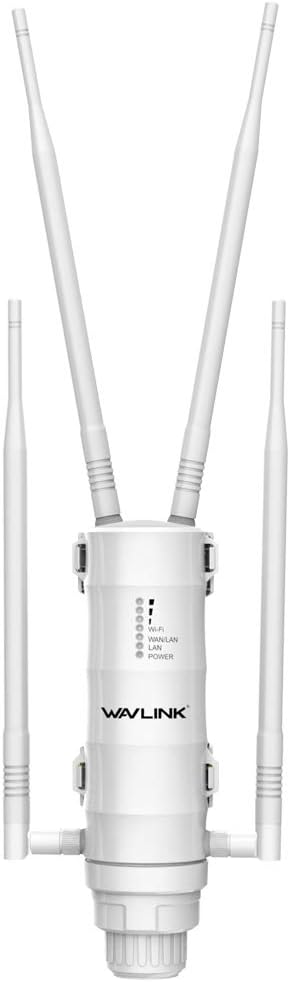 |
| It looks a the head of a mantis, to me. |
It's on the pricier side of the lists that I looked at but it got four stars on nearly every review I read and has the same rating on Amazon. It's IP65-rated weatherproof, which means it can survive in almost any sort of extreme weather. It supports Passive PoE (Power over Ethernet) and speeds up to 2.4GHz at 300Mbps, 5GHz at 867Mbps. Many of the reviews claim that the extender can cover 300-350 yards. This is the one I'm trying to convince my parents to go with.
Like I have said in previous posts, our internet service provider is a company called "DataTruck". They have been the properties provider since at least 2011. On the plan we have with them, we currently get 10 Mbps, but sometimes the service isn't as reliable as we like it. Often times, we will get cutouts, slow speeds, or bad connections. These aren't occurrences that you want happening during an important video call or an intense gaming session (that one is mostly for my brothers and me). In fact, an outage happened while writing this part of the post. There were a few options to check out, like Hughesnet, a satellite service provider, or Centurylink. Centurylink is a DSL internet service that has quite a few good reviews for its residential, rural, and business services.
Our neighbors use Centurylink and, according to my parents, have said nothing but good things about it. With DataTruck, we paid around $50/month for 10Mbps. With Centurylink, they say we could get around a more solid connection with 60Mbps for around the same price. Faster and more reliable internet is the way to go and seem like a win-win to me. So, we could be looking at getting a new provider sometime in the near future, if I play my cards right.
Subscribe to:
Posts (Atom)