Sunday, June 28, 2020

Chap. 5: Equipment

After deciding we were switching to CenturyLink, they came out and set up a modem and reconnected out telephone lines. With CenturyLink ready to be connected, my stepfather and myself decided it was time to finalize our decisions on what equipment we wanted to use for routers, access points, and switches. I wanted to get some help and second opinions on what to use. So, I and my parents went to A-I Computers in Watertown, SD to see what ideas we all came up with. Most of the equipment recommended was from the company Ubiquiti.

Equipment List from A-I -
UniFi Long-Range Access Point:
  Range – 600 Ft.
  Networking Interface - (1) 10/100/1000 Ethernet Port
  Ports - No
  Buttons - Reset
  Antennas - Dual-Band Antenna
  Power Method - Passive Power over Ethernet (24V)
  Power Supply - 24V, 0.5A Gigabit PoE Adapter
  Operating Temperature -  -10 to 70° C (14 to 158° F)
  Operating Humidity -  5 to 95% Noncondensing
  1 Unit - $109
  5-Pack - $499

UniFi Security Gateway:
  Networking Interfaces & Ports - (1) RJ45 Serial Port, (3) 10/100/1000 Ethernet Ports
  Max. Power Consumption  - 7W
  Power Supply - 12VDC, 1A Power Adapter (Included)
  Supported Voltage Range - 9 to 24VDC
  Operating Temperature -  -10 to 45° C (14 to 113° F)
  Operating Humidity - 10 to 90% Noncondensing
  1 Unit - $139

UniFi Switch 8:
   Power Supply - External AC/DC Adapter: 48V, 0.5A, 25W AC/DC Power Adapter Included
  Max. Power Consumption - 12W (Excluding PoE Output)
  Data Rate - 8 Gbps, Non-Blocking
  Operating Temperature -  -5 to 45° C (23 to 113° F)
  Operating Humidity -  5 to 95% Noncondensing
  (8) Gigabit Ethernet Ports
  (1) PoE Passthrough Port
  1 Unit - $99
  5-Pack - $480

UniFi Switch 8 60W:
  (8) Gigabit Ethernet Ports
  (4) Auto-Sensing IEEE 802.3af PoE Ports
  Data Rate - 8 Gbps Total, Non-Blocking
  60W AC/DC Power Adapter Included
  Operating Temperature -  -5 to 45° C (23 to 113° F)
  Operating Humidity -  5 to 95% Noncondensing
  1 Unit - $109
  5-Pack - $540

UniFi Mesh PRO Access Point:
  Range – 600 Ft.
  Data Rate - 1750 Mbps
  Omni-directional Super Antennas
  Antennas - 3 Dualband antennas
  Ports - (2) 10/100/1000 Ethernet
  Buttons - (1) Reset
  Operating Temperature -  -40 to 70° C (-40 to 158° F)
  Operating Humidity -  5 to 95% Noncondensing
  1 Unit - $199
  5-Pack - $975

UFiber GPON Wi-Fi Router:
  Data Rate - 2.4 Gbps Downstream and 1.2 Gbps Upstream
  24V passive PoE or a 24V, 0.5A power adapter
  (1) GPON WAN Port
  (4) RJ45 Gigabit LAN Port
  Wi‐Fi
  1 Unit - $69


They created a map design on what equipment should be placed where and how the range should look.
*Red boxes mark buildings.
*Green hexagons mark spots where equipment may be installed (this includes routers, switches, wireless access points, and outdoor wireless gear as well).
*Blue lines are straight-line cable runs.
*White circles indicate indoor wireless signals, not-to-scale.
*Cyan gradient indicates outdoor wireless signals. The teal outline is the maximum range as described for the access point (600 feet).

We hope to have most, if not all, equipment ordered and shipped by the middle of the week this post is "posted".

Sunday, June 21, 2020

Chap. 4: Discussions

Sorry for the incredibly short post, this week was mainly discussion-based.

Having met with my parents for a few sit-downs about whether or not they would like to switch or stay with the current provider, they have decided to change internet providers and switch to CenturyLink. With better speeds, connectivity, and the good things that they heard from neighbors, they felt it was the best choice. It took them a long time to decide, but configuring/changing an internet, probably, isn't easy. Hopefully, we can switch early in the week. We are still looking at different extenders, but once CenturyLink is installed on our property, we will move forward and decide what we want to do on that front.

Sunday, June 14, 2020

Chap. 3: First Report Hand-In

After doing some more internet window shopping and using some of what I wrote last week, Here is the report I gave to show what I found and would recommend on what to using for extenders and changing internet providers.

Findings:
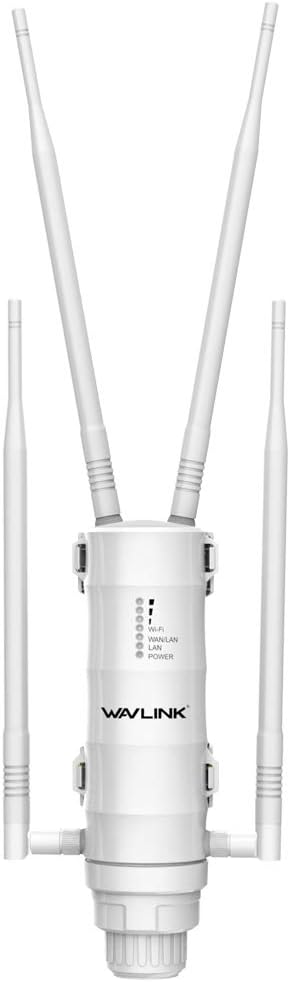
Firstly, I will go over the extender. After going over different lists by other sites giving their opinion on what they think is the best extender, I think I found one. It is called the WAVLINK AC1200 Outdoor Weatherproof Wi-Fi Range Extender for $139.99. It is on the pricier side of the lists that I looked at, but it got four stars on nearly every review I read and has the same rating on Amazon. It is IP65-rated weatherproof, which means it can survive in almost any sort of extreme weather.
It supports Passive PoE (Power over Ethernet) and speeds up to 2.4GHz at 300Mbps, 5GHz at 867Mbps. Many of the reviews claim that the extender can cover 300-350 yards. The same company also makes a $60 dollar model, called N300, but it is less powerful and not as weather resistant. Another one on the cheaper side is the TP-Link EAP225-Outdoor Omada AC1200 Wireless Access Point. It has mostly the same features, up to 1200Mbps in speed, and it is PoE Powered. It also has a supposed range of 656.168 feet.
Our internet service provider is a company called "Data Truck". On the plan we have with them, we currently get 10 Mbps (0.01 GigaBytes per second), but sometimes the service is not as reliable as I would like it. Often, we will get cutouts, slow speeds, or bad connections. These are not occurrences that you want happening during an important video call or an intense gaming session (that one is mostly for my brothers and me). In fact, an outage happened while writing this part of the report. There were a few options to check out, like HughesNet, a satellite service provider, or CenturyLink.
I checked HughesNet and with their best plan, we would get 44.4 Mbps (0.044 GBps) for $60/month. CenturyLink is a DSL internet service that has quite a few good reviews for its residential, rural, and business services. Our neighbors use CenturyLink and have said nothing but good things about it. The internet reviews give it between three to five stars. With Data Truck, we paid around $50/month for 10Mbps. With CenturyLink, they say we could get around a more solid connection with speeds of 60Mbps (0.06 GBps) for around the same price with an extra $10 for the modem lease. So, the total would be $59. Even though it is ten dollars cheaper, I think that CenturyLink is the best option for updating and changing providers. Faster and more reliable internet is the way to go and seem like a win-win to me.

Sunday, June 7, 2020

Chap. 2: Google can be a researcher's best friend

This post is going to be a bit shorter than the others. Mainly due to what my two tasks were this week:
1 - Research for possible candidates for an outdoor WiFi extender.
2 - Research different Internet providers.

Instead of telling you how long I searched for and the multiple websites that I found, I'll get to the gist of it. Firstly, I'll go over the extender. After going over different lists by other sites giving their opinion on what they think is the best extender, I found one that my parents are interested in. It's called the WAVLINK AC1200 Outdoor Weatherproof WiFi Range Extender for $139.99.

It looks a the head of a mantis, to me.
It's on the pricier side of the lists that I looked at but it got four stars on nearly every review I read and has the same rating on Amazon. It's IP65-rated weatherproof, which means it can survive in almost any sort of extreme weather. It supports Passive PoE (Power over Ethernet) and speeds up to 2.4GHz at 300Mbps, 5GHz at 867Mbps. Many of the reviews claim that the extender can cover 300-350 yards. This is the one I'm trying to convince my parents to go with.

Like I have said in previous posts, our internet service provider is a company called "DataTruck". They have been the properties provider since at least 2011. On the plan we have with them, we currently get 10 Mbps, but sometimes the service isn't as reliable as we like it. Often times, we will get cutouts, slow speeds, or bad connections. These aren't occurrences that you want happening during an important video call or an intense gaming session (that one is mostly for my brothers and me). In fact, an outage happened while writing this part of the post. There were a few options to check out, like Hughesnet, a satellite service provider, or Centurylink. Centurylink is a DSL internet service that has quite a few good reviews for its residential, rural, and business services.

Our neighbors use Centurylink and, according to my parents, have said nothing but good things about it. With DataTruck, we paid around $50/month for 10Mbps. With Centurylink, they say we could get around a more solid connection with 60Mbps for around the same price. Faster and more reliable internet is the way to go and seem like a win-win to me. So, we could be looking at getting a new provider sometime in the near future, if I play my cards right.